File preview widget
A file preview widget allows you to embed an image, video, PDF, or audio file within a view. Audio and video files are displayed with playback controls. For example, you could use a file preview widget to display a promotional video or to allow users to view quotes or invoices that have been generated for a particular customer.
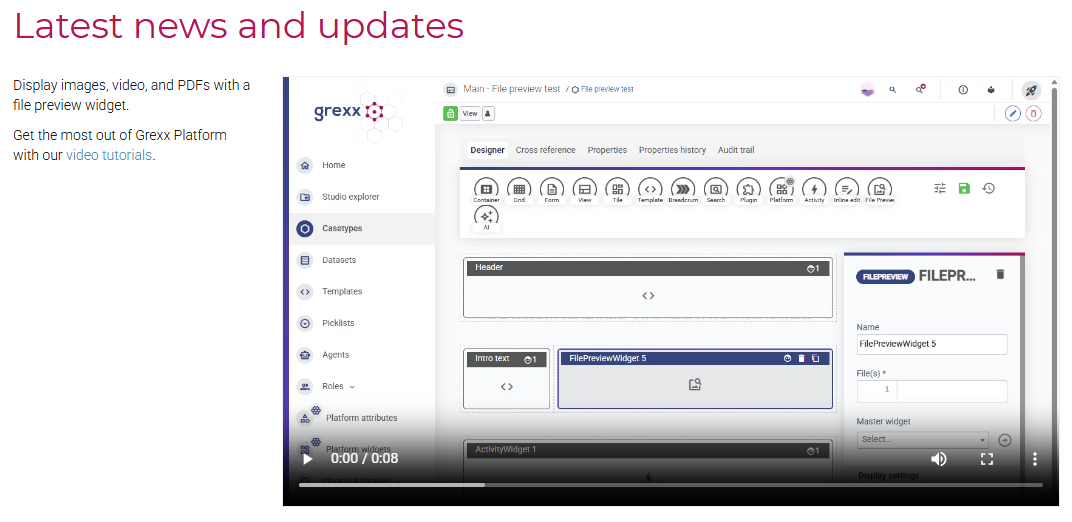
You can use a file preview widget to display files stored in attribute on cases and static files that you have uploaded to your Studio:
- To display a file stored in an attribute, use the
case.template function to access the attribute on the selected case. If you specify a multivalue file attribute, each file is displayed in a separate tab within the widget. - To display a static file, use the
file.Static file objecttemplate function, and then configure the template function to select the static file.
The following file formats are supported:
| Type | Supported formats |
|---|---|
| Audio | aac, mp1, mp2, mp3, m4a, oga, ogg, wav |
| Image | avif, bmp, gif, jpeg, jpg, png, svg, webp |
| Video | mp4, mpeg, mpg, m4v, ogv, webm |
If you select a file in a different format, the widget displays the file name and size together with a link to download the file.
You can combine a file preview widget with a grid or tile widget. When configuring the file preview widget, select the relevant grid or tile widget from the Master widget list. When a user selects a case from the grid or tile widget, the file preview widget displays the file(s) from the specified attribute on the selected case. For example, you could list products in a grid or tile widget, and use the file preview widget to display images of the product that the user has selected.
For more information about uploading and managing files, see File management.